Movie masters - resource
Thanks for joining us for a Movie masters webinar. Teachers, if you've found your way here and haven't attended a webinar you can find more dates here.
In the session we encouraged students and teachers to have a class discussion after. Here are those discussion points again:
Today I learnt….
I already knew about…
I was surprised by…
I’m inspired to….
Student film example
If you would like to watch the whole student film that we referenced in the webinar, you can check it out below.
It can be a great activity to watch a short film made by students, and make note of things you like about it, things you thought were clever, and think about how they did it - and how you might do something similar with your film.
For example, we mentioned the great use of sound effects in this film during the webinar. We also highlighted the great editing with the vase breaking scene, as well as props, costumes and location scouting they would have done.
You might also notice special effects used in this film, and other editing techniques you might be intrigued by.
Screenwriting
Watch the video below for information on the fundamentals of screenwriting and script formatting:
Script elements
Formatting is how words are arranged and laid out on the page. Try using scriptwriting software such as Celtx or Writers Duet as they have shortcut keys that make formatting it easy.
A script is broken into elements which are formatted according to a set of rules. Screenwriters are also expected to use the Courier New font. Here are the different elements you see in a script:
Scene heading
A scene heading, or 'slug line' is where you set the scene. In a scene heading we need to know:
- If it is taking place indoors or outdoors (interior or exterior? INT. for interior and EXT. for exterior)
- Where it is (in a living room? A city street?)
- Time of day (day or night?)
Here's a quick example:
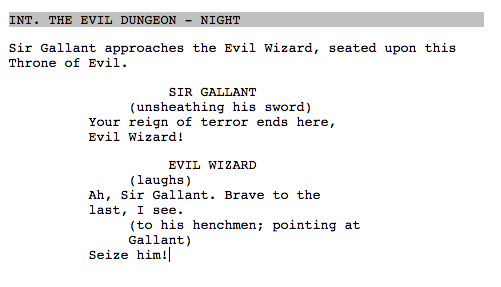
INT. CITY STREET - DAY
----
Action
You describe where the characters are, what is happening, and what you want the audience to see. For example:
Alex and her mum stand in front of a rambling old house. A 'SOLD' sign hangs out the front.
Character and dialogue
When you first introduce a character in action, you write their name in capitals so it stands out. Every time after this you write it normally.
Once you have set up the scene, the action and your main character, you can introduce your character’s dialogue. You start by writing their name.
The dialogue is fitted neatly under the character's name, so it’s easy for the actors to know when they have to say something, as opposed to doing something. Notice too that when characters have dialogue, their name is in bold and centred on the page.
Activity: fix the scene
Here is a scene, but it's laid out all wrong!
Ext. Old house. Day.
Alex and her mum stand in front of a rambling old house in front of them. A ‘sold’ sign hangs out the front. Mum: Home sweet home! Alex: I want to go back to our old house. Mum: Just give it some time and it will feel like home. Alex: Whatever.
Alex storms off.
Rewrite the above scene and ready it for the screen. See if you can put this scene into the correct script formatting using scriptwriting software, a word or text document on a computer, or by hand.
Screenwriting
Screenwriting resource
Want to find out more? We've a whole resource dedicated to screenwriting, check it out below:
Camera shots and angles
Find our more about camera shots, as well as camera angles by clicking through to the resource below:
Camera shots
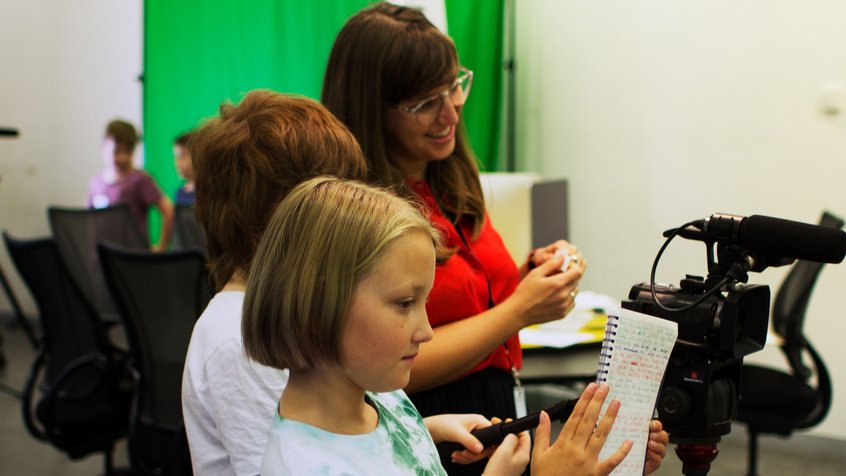
From close-ups to mid-shots, extreme long shots to extreme close ups, find out more about camera shots.
Storyboards
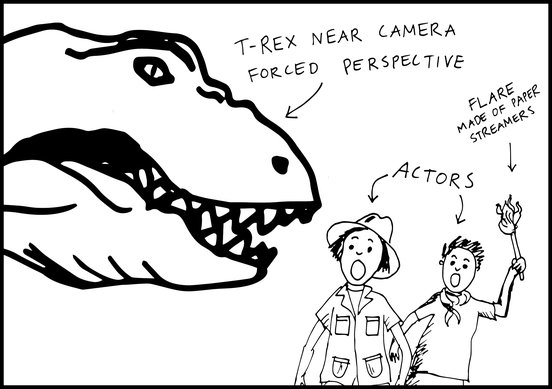
Storyboards are a lot of fun to make and are incredibly useful in bridging the gap between your script, and actually filming your film.
Check out the resource below for activities around turning scripts into storyboards:
Recording sound
Sound is so important to movies, and it can be a little overwhelming how much you can do when it comes to sound. We'll try and simplify things for you!
First, make sure you have a microphone, and try out how well it does in different settings such as outdoors, indoors, with speaking characters close, and far away.
This will help you anticipate issues when it comes round to filming.
The most important thing you want to capture is most likely dialogue - so the wonderful lines you've written for your characters, it's probably pretty important to make sure that's recorded clearly.
You will capture environment sounds on set, so sounds that occur in your scene, sounds that the character makes interacting with the world in the scene.
These next things are things you can try out capturing if you're feeling confident, and want to extend yourself:
Room tone - in each interior location you film, with whatever you're capturing your audio with nice and still, record a minute or two of just the sound of that room. This can be helpful when it comes to editing, because, everytime you move the camera inside a space and record your characters doing things, speaking etc, the sound will change a little bit (or a lot!) from shot to shot.
With some room-tone audio recorded, you can balance out these changes.
Ambient sound - similar approach to 'room tone', but you capture a minute or two of exterior sound at each location. Again, it can be super helpful when you're editing.
For example, say you filmed a scene in the playground, and you have multiple shots, with lots of dialogue going on - the background sound in each shot might change a lot - maybe kids start and stop playing a game during your filming. If you record a minute or two of the sound from that space, you can edit it into the scene later, and smooth out any obvious changes in background audio.
ADR - this is what we call dialogue that is recorded again in a sound booth or a controlled space, so we get a cleaner, crisper version of your actor's dialogue. Especially good for scenes where the characters are too far away from your camera and microphone to pick up the dialogue - you can record the dialogue later inside, and add it your scene.
Troubleshooting sound issues
When shooting outdoors, wind messes with my audio
- Find a place where the wind is blocked and isn’t blowing directly into your microphone.
- Think about moving the scene to a controlled setting, meaning, somewhere where the wind won’t have an effect.
I can’t hear what my actors are saying
- Move the camera or microphone closer to your actors when they are saying their lines. This might affect the type of shot you were planning on using, so you'll have to decide what is more important.
- Make sure your microphone is pointing at your actors. If you're trying to get dialogue from more than one actor in a shot, you might find it difficult to record both clearly, particularly if one has their back to the microphone or if one is further away from the microphone than the other. You might have to rethink how you record the scene, or how you want to position your actors.
- Re-record the dialogue later inside in a quieter place, and add the dialogue into the scene later. If you're doing this, it's best if the characters lips can't be scene, unless you want to try and perfectly match the new dialogue recordings to the movement of their lips (which you can certainly try to do if you are feeling ambitious!)
Sound and dialogue is really loud and crackly when I playback my video and audio
- If outside, crackling might be because of the wind – try to block the wind or shoot somewhere where wind isn’t blowing into your microphone.
- If your microphone is too close to your actors, or your actors are yelling and whilst quite close to the microphone, the sound might be too loud for your microphone. Try getting your characters to tone it down a little, or move the microphone a little further away.
My microphone picks up unwanted sounds and drowns out the sounds I do want.
- Reposition the microphone so it’s close and is pointing at the source of the sound you want to record.
- Move to a controlled environment, somewhere you can control who is ‘on set’ or somewhere you know is quieter.
Background noise changes and other audio levels change dramatically between the clips I've filmed for a scene
- You might want to record room tone and ambient sounds when on set, sounds that your editor can later use to help disguise dramatic changes in sound and volume from one video clip to the next. This is a bit more advanced, but basically, if your sound person captures extra sounds (even if it’s using the camera, you can always get rid of the footage and keep the sounds when you edit your film) then it can go a long way to help the editor produce great sound design for your film.
Editing
Want to practice your editing skills? We've a resource that includes raw video files and a script for a scene you can edit together yourself. Check out that resource below:
Editing
Check out our resource on editing, which goes further into rough and fine cuts and editing techniques. You can even use a script and footage ACMI have shot to practice editing a scene together using your editing software.